Pick your planFamilyHouseholdCrewCompany
Family · Household · Crew · Company

Everybody checks in. Everybody knows.Family. Household. Crew. Company.

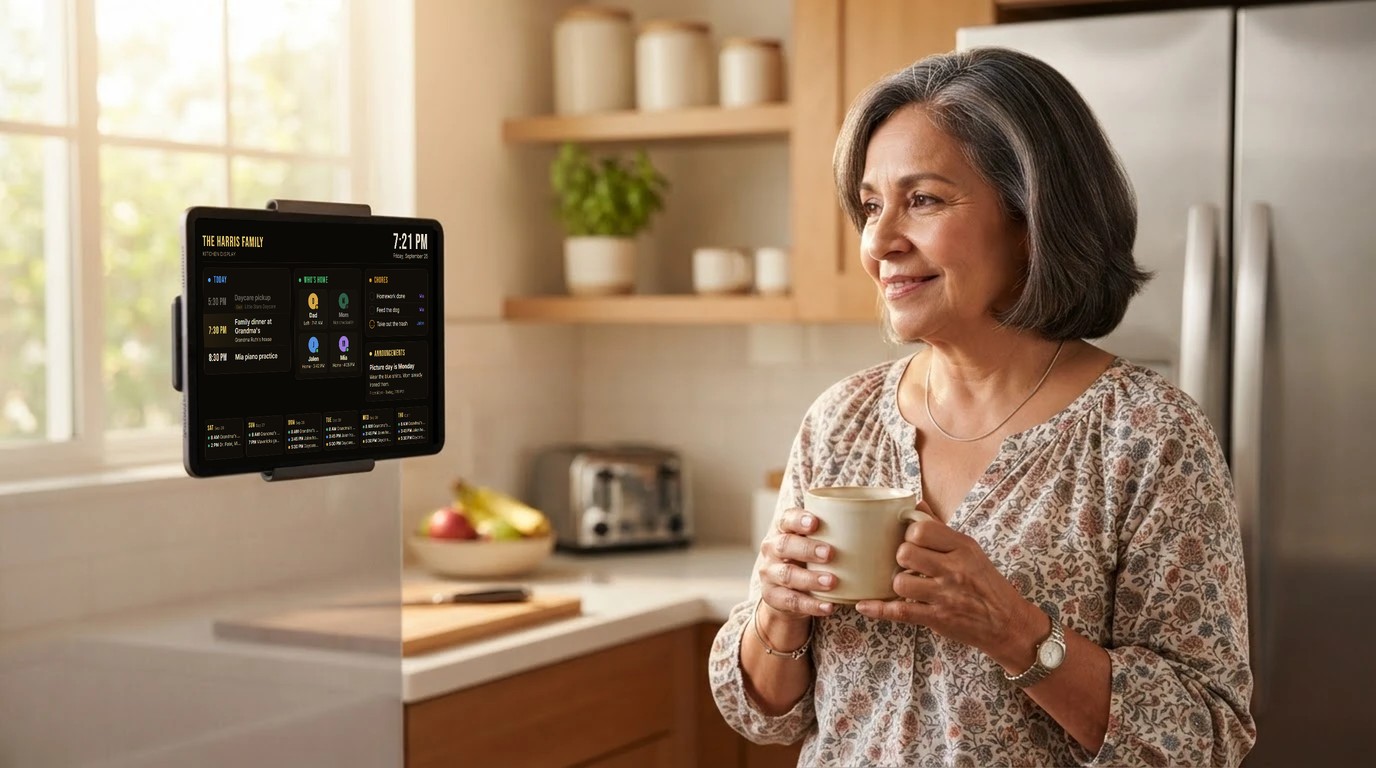
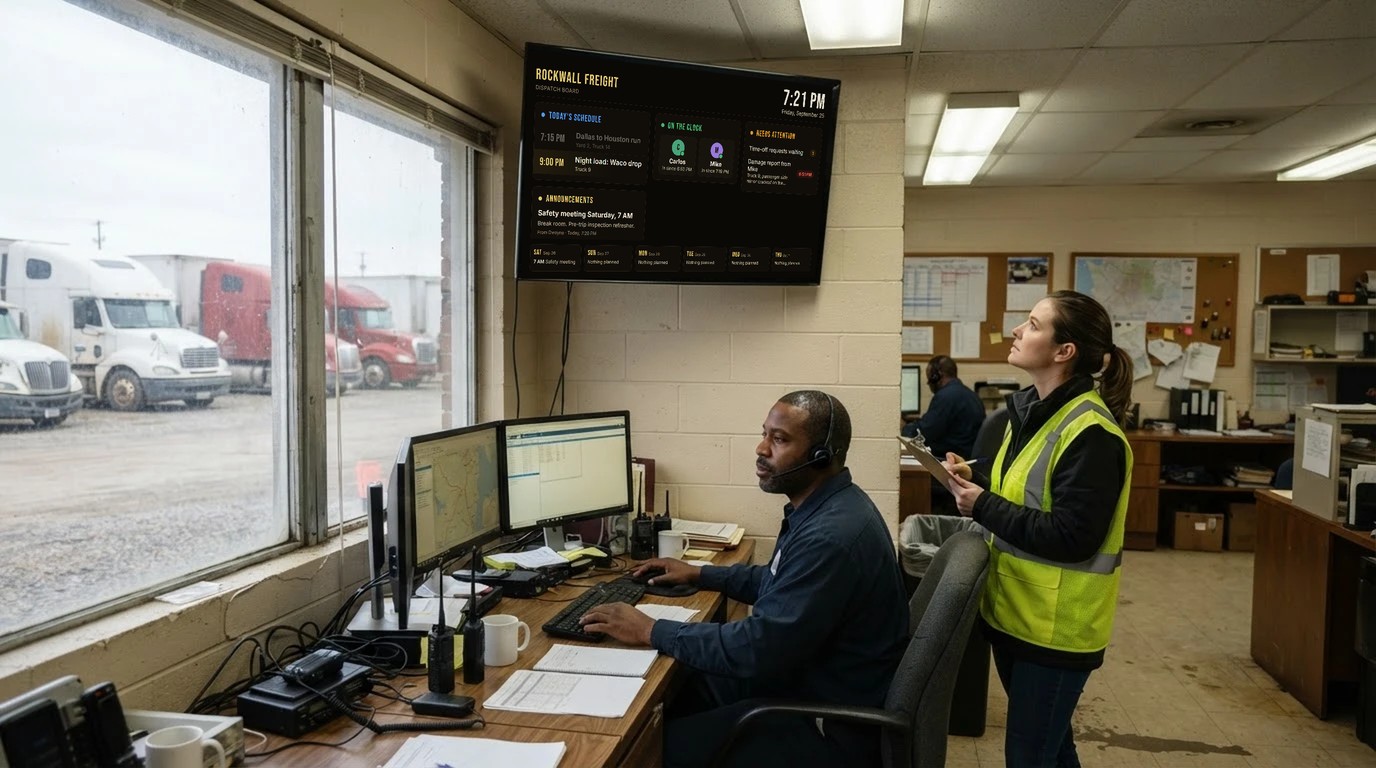
One app where your kids tap I'm home, chores get checked off and approved, the daycare pickup pings you an hour ahead, and the whole family talks in one place. Same app runs your household staff, your trucking crew, or your call center. Pick your kind, everything else is a switch.

No background tracking, ever. Location is read only at the moment someone taps check in. Every plan starts with a 14-day free trial.
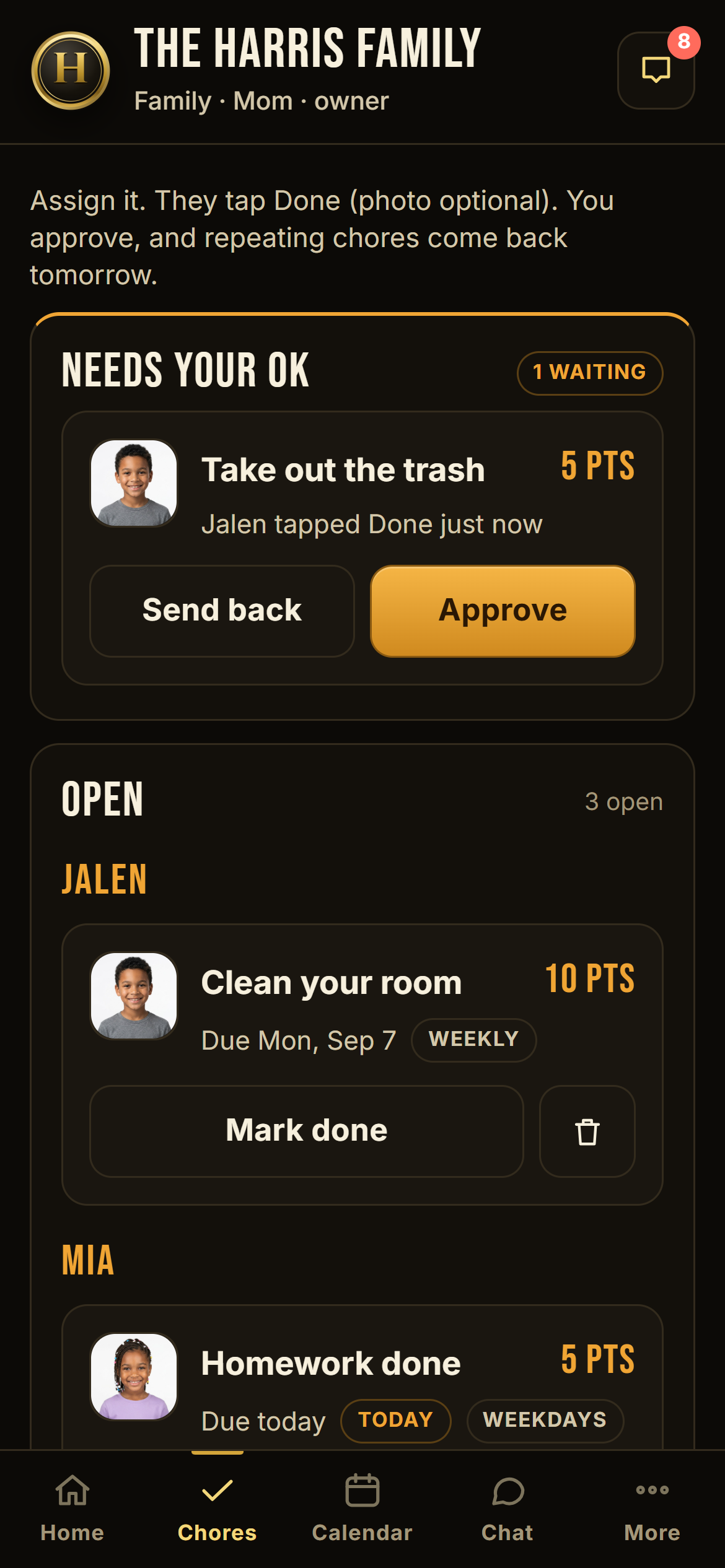
A kid's chores screen with a big Done button
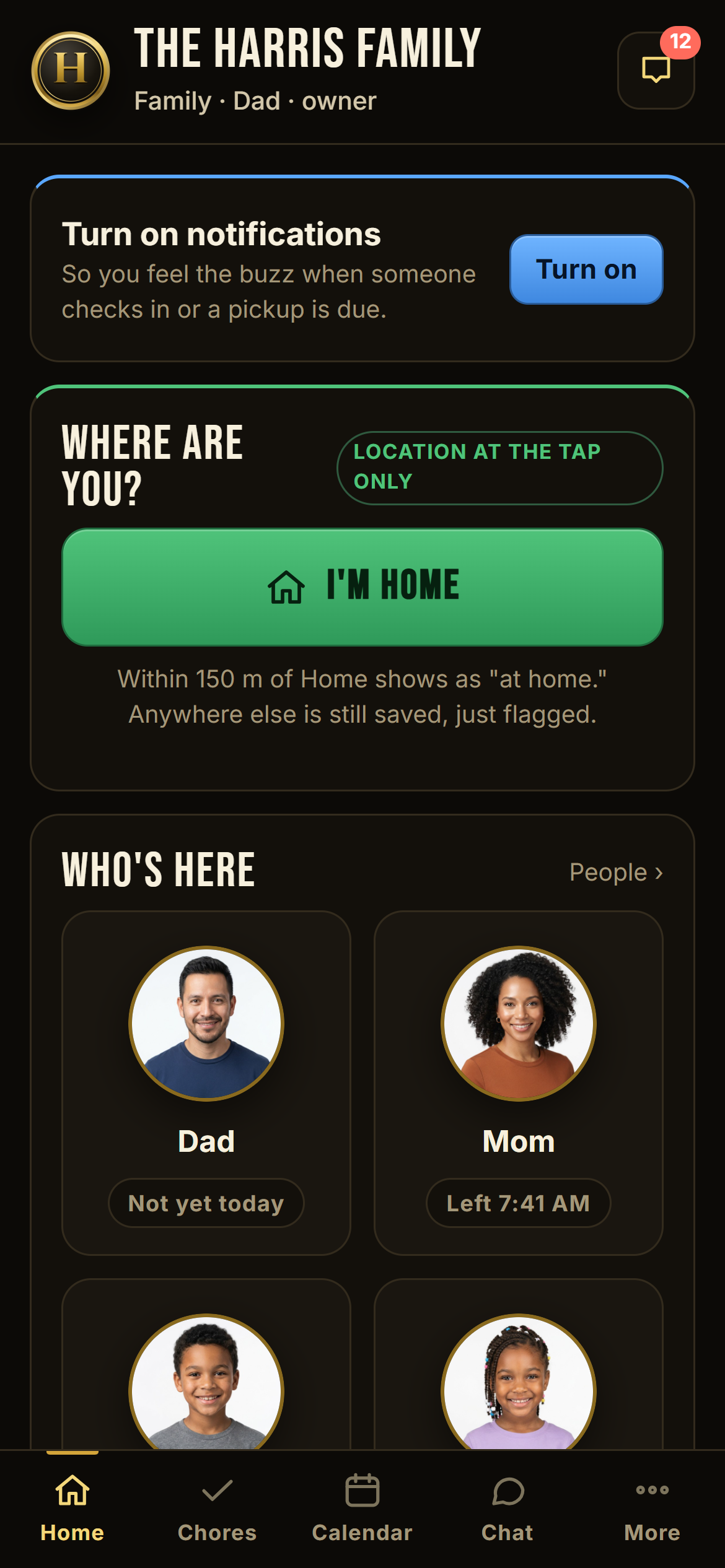
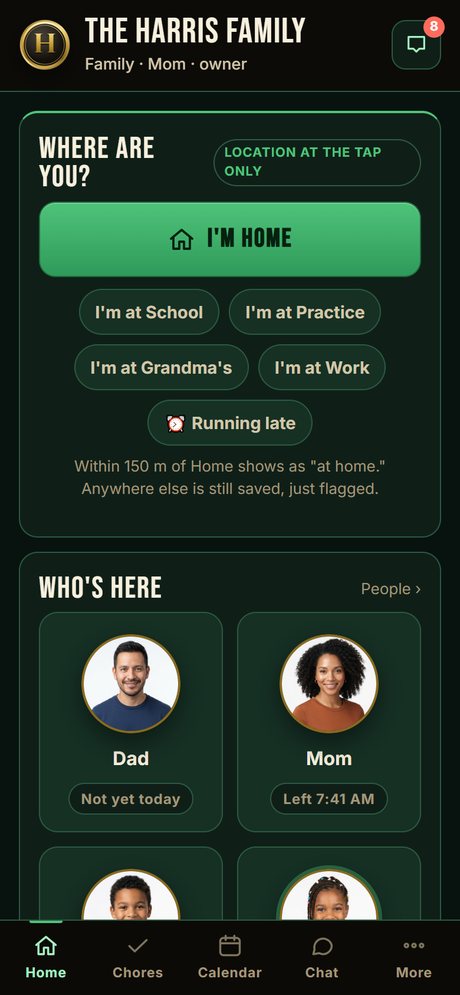
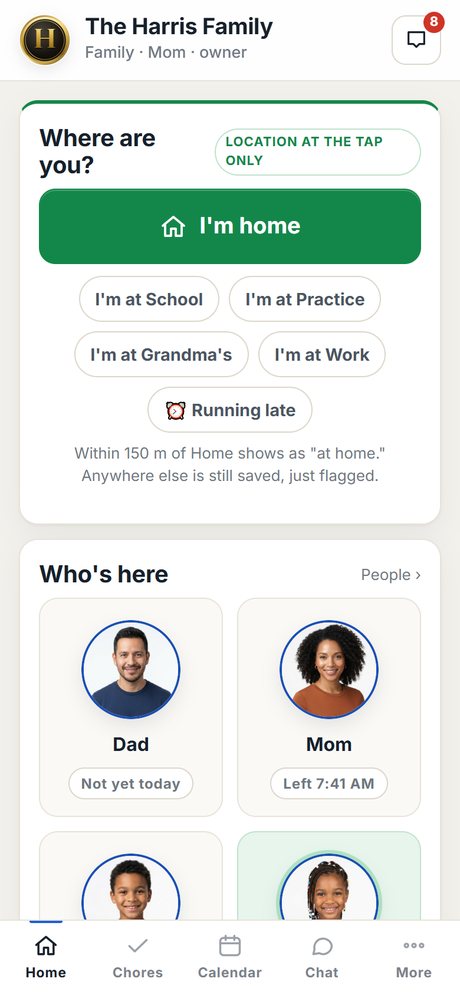
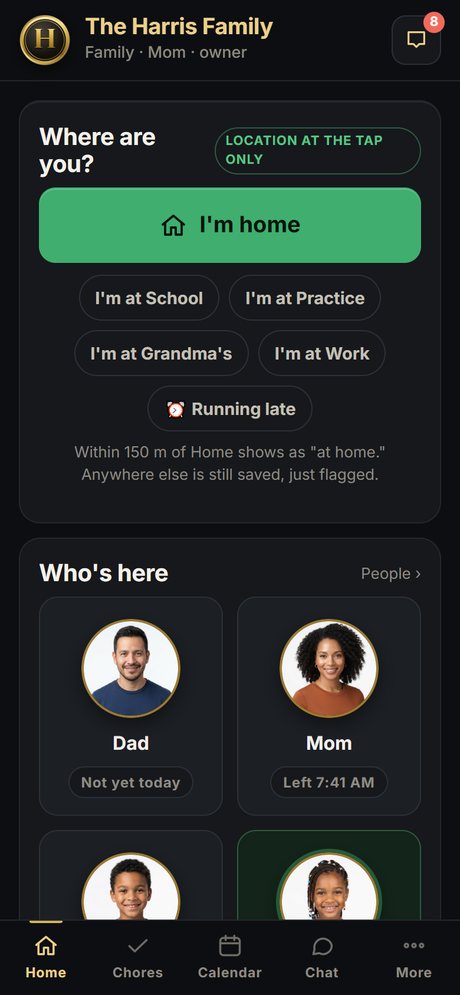
Parent home screen: who's here, today's pickup, the I'm home button
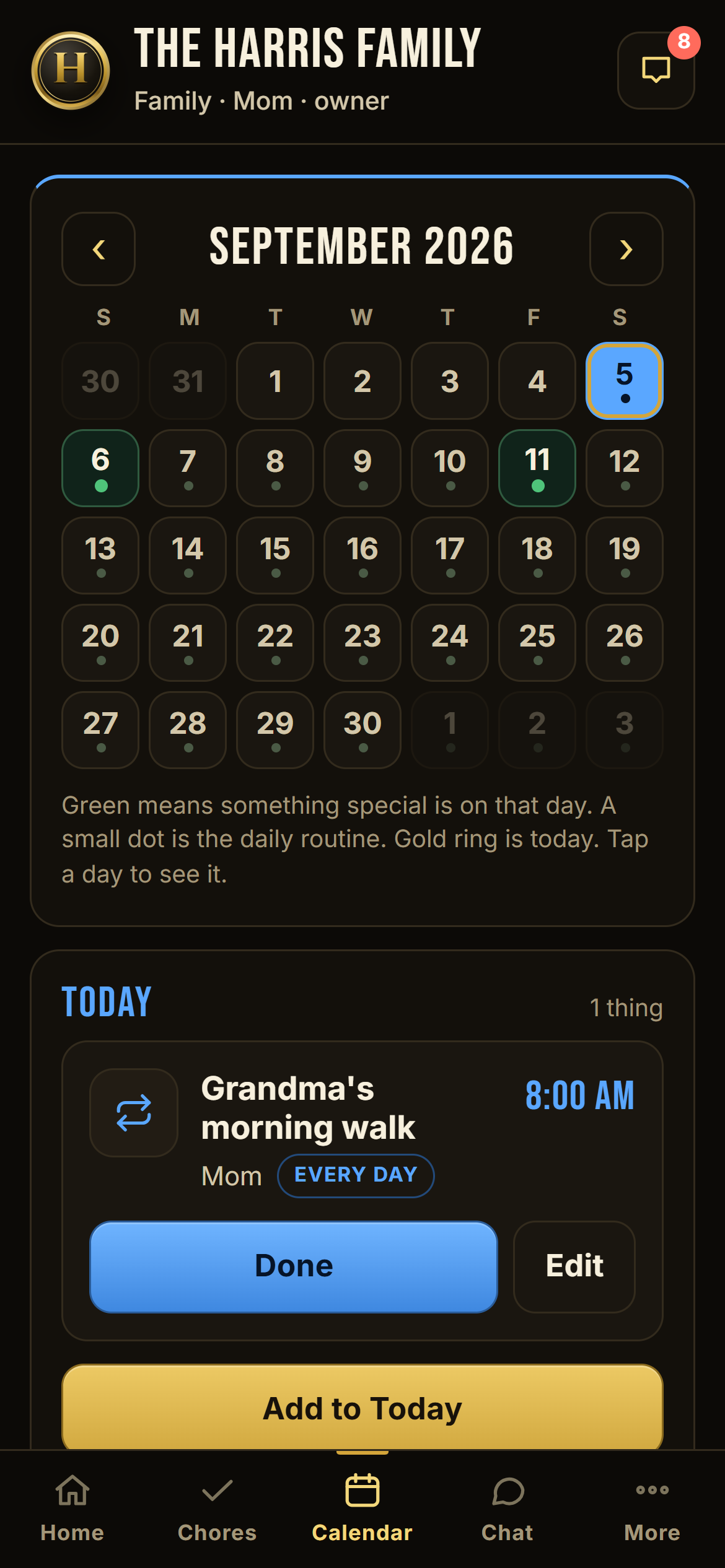
Family calendar with daycare pickup and Got them button
At the tap onlyNo background GPS. Ever.
One flat priceNever per seat. Never a surprise.
Never lose a punchWeak signal? Saved and flagged.
Your data is yoursExport everything in one tap.
How it works

Three steps. Under five minutes.

1

A grown-up creates the group

Pick Family, Household, Crew, or Company. You get a 6-letter code. Stand at the house and tap "use where I am now" so check-ins can say "at home."

2

Add your people

Kids and staff get a name and a PIN, no email needed. Other grown-ups join with the code. Make your co-parent an owner so you both have the same power.

3

Everybody taps

I'm home. Done. Got them. Made it. I'll take it. Each tap tells the right people, at the right time, with the time stamped. That's the whole app.

What's inside

Built to fix what the other apps get wrong.

We read a few thousand one-star reviews before we wrote a line of code. Every feature below answers a complaint people already have.

Kid home screen with the I'm home button
3:42 PM. Jalen drops his backpack and taps I'm home. Mom's phone buzzes at work: "Jalen is home, 3:42 PM, at home."
Check-ins

One tap. No tracking.

Your kid gets home from school and taps I'm home. You're at work and your phone says "Jalen is home, 3:42 PM." If they haven't tapped by the time you expect, both parents get a nudge.

  • Location is read once, at the tap, and compared to your home radius. Nothing runs in the background, so no battery drain and nothing to sell.
  • Outside the radius or weak signal? The tap is still saved, just flagged "location unconfirmed." We never block an honest check-in.
  • Offline? It queues on the phone and sends later with the original time.
Parent chores screen with Approve and Send back
Jalen tapped Done on the trash. It lands in Mom's "Needs your OK." One tap to approve, and tomorrow's is already waiting.
Chores

Assign. Done. Approved.

Assign the trash to Jalen, every day, 5 points. He taps Done, snaps a photo if you want proof, and it lands in your "Needs your OK." Approve it and tomorrow's is already waiting. Send it back with a note if the job's not done.

  • Points add up on a 30-day scoreboard the kids can see.
  • Kids only see their own chores. Parents see everything.
  • No allowance bank you have to pay for. Chores are free on every plan.
Calendar with daycare pickup, appointment and game
4:30 PM: "Pickup in 60 min: Daycare pickup." 5:00: again. 5:32, Dad taps Got them and Mom sees it.
Calendar + reminders

The 5:30 pickup never gets missed.

Set the daycare pickup once, weekdays at 5:30, assigned to you. You get a push at 4:30 and 5:00. When you've got them, tap Got them and the other parent sees it. If nobody taps by 5:40, both parents get pinged.

  • Pickups, appointments, daily routines, and expected-home times, each with its own heads-up lead time. Grandma gets a Done button, and you get pinged if she doesn't tap it.
  • Anyone in the family can add to the calendar: "Mavericks game Friday 7pm, American Airlines Center."
  • Every push also lands in the in-app inbox, and there's a "test my notifications" button. Silent notification death is the number one complaint about every competitor.
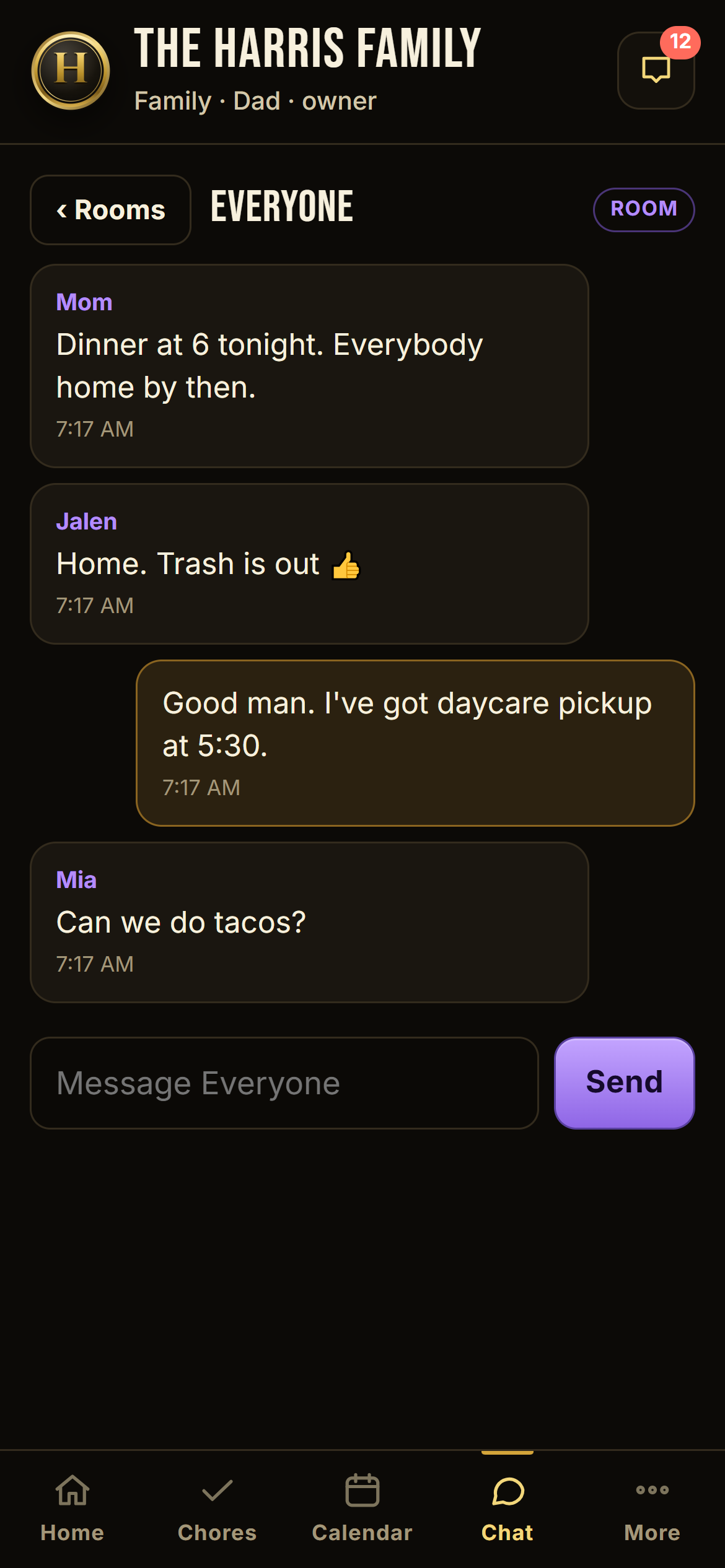
Family chat room
Everyone chat for a family. Off by default for a company. Announcements always get through either way.
Chat + announcements

You decide who talks to whom.

A family wants one room where everybody talks. A call center owner doesn't want 150 agents in a group chat. Both are one switch. Announcements always get through, even with every chat off.

  • Everyone chat, team chat, and direct messages are each a switch. "Only up the chain" means staff message you, not each other.
  • A supervisor's announcement reaches their team. The owner's reaches everyone, or supervisors only, or one team, or hand-picked people.
  • Read receipts on every announcement: you see who read it and who didn't.
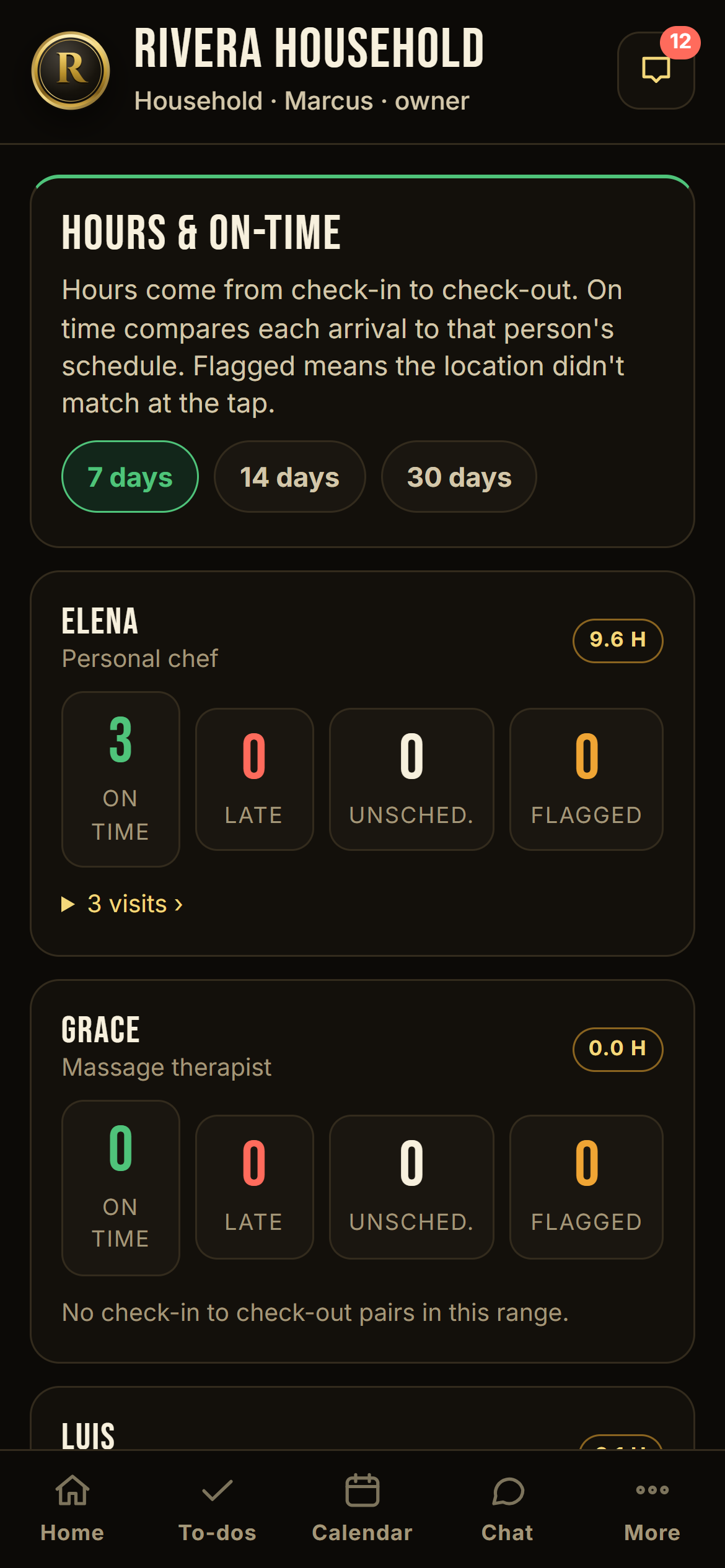
Hours and on-time report for household staff
Elena the chef, three visits this week, all on time. Luis flagged once, his tap came from the street, not the yard.
Household staff

Your chef, your trainer, your lawn guy. On time, on record.

Give each worker a schedule: chef Monday, Wednesday, Friday at 4. They check in on their own phone when they arrive, within your home radius. Hours total themselves. You get an on-time report per visit: on time, late by 12 minutes, left early, no-show.

  • Staff never see the family's feed, chores, or calendar. They see their own schedule and message you.
  • Flip one switch to let a specific worker talk to a specific family member.
  • Nobody else gives household staff a real role. Most family apps give everyone you invite full access to everything.
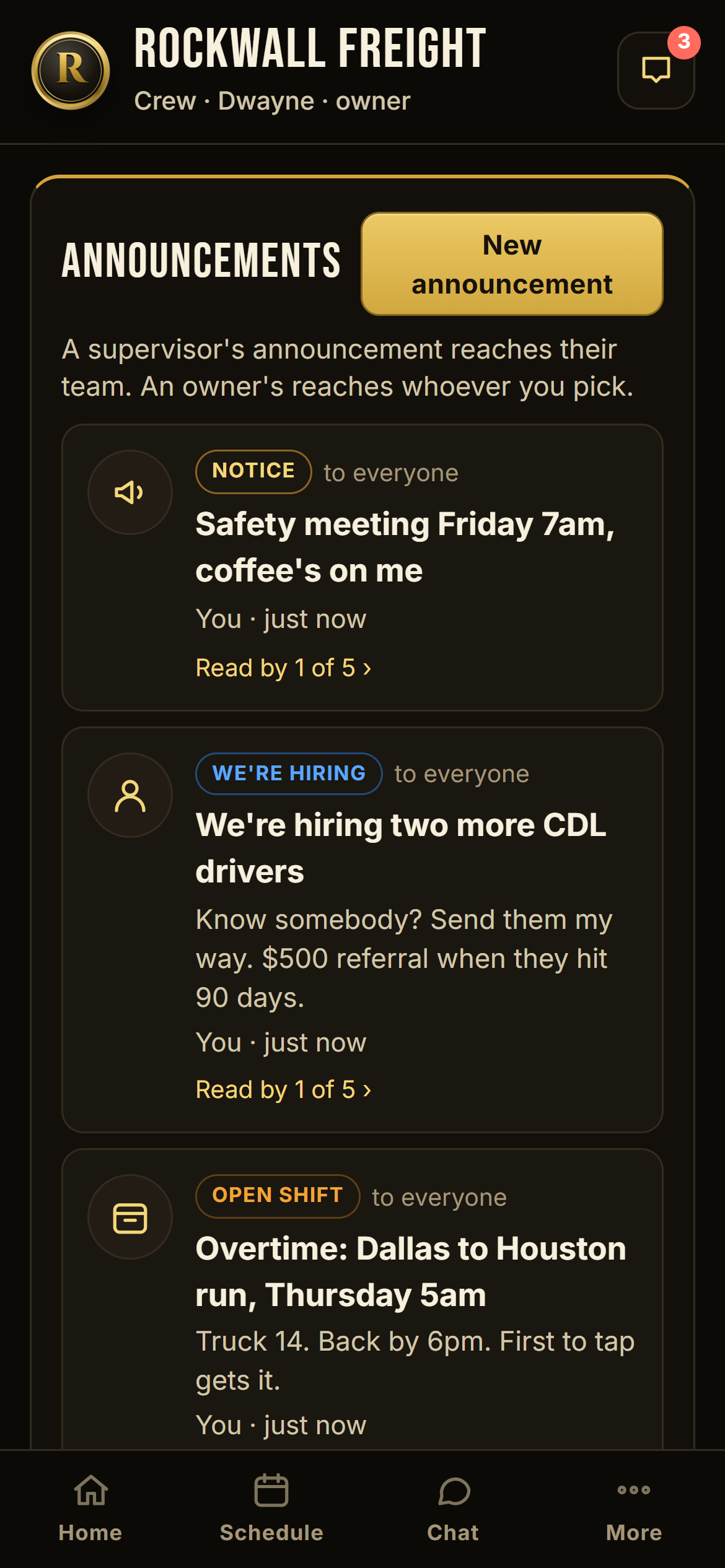
Crew announcements with an open shift claimed
Dwayne posts the Houston run at 6:10 AM. Carlos taps I'll take it at 6:14. Done, and everybody else knows it's gone.
Crews

"Anybody want some overtime?"

Post the Dallas to Houston run as an open shift. Every driver's phone buzzes. Carlos taps I'll take it and it's his, or you approve the taker first, your call. Same button for "we're hiring" and "safety meeting Friday, coffee's on me."

  • Drivers clock in by location. A cracked mirror gets photographed and sent as a damage report straight to you, time-stamped.
  • Time-off requests route to the driver's supervisor, not every manager.
  • $29 flat for 50 people. The per-seat apps charge that for 30 users and climb from there, and none of them have a real inspection photo flow without hardware.
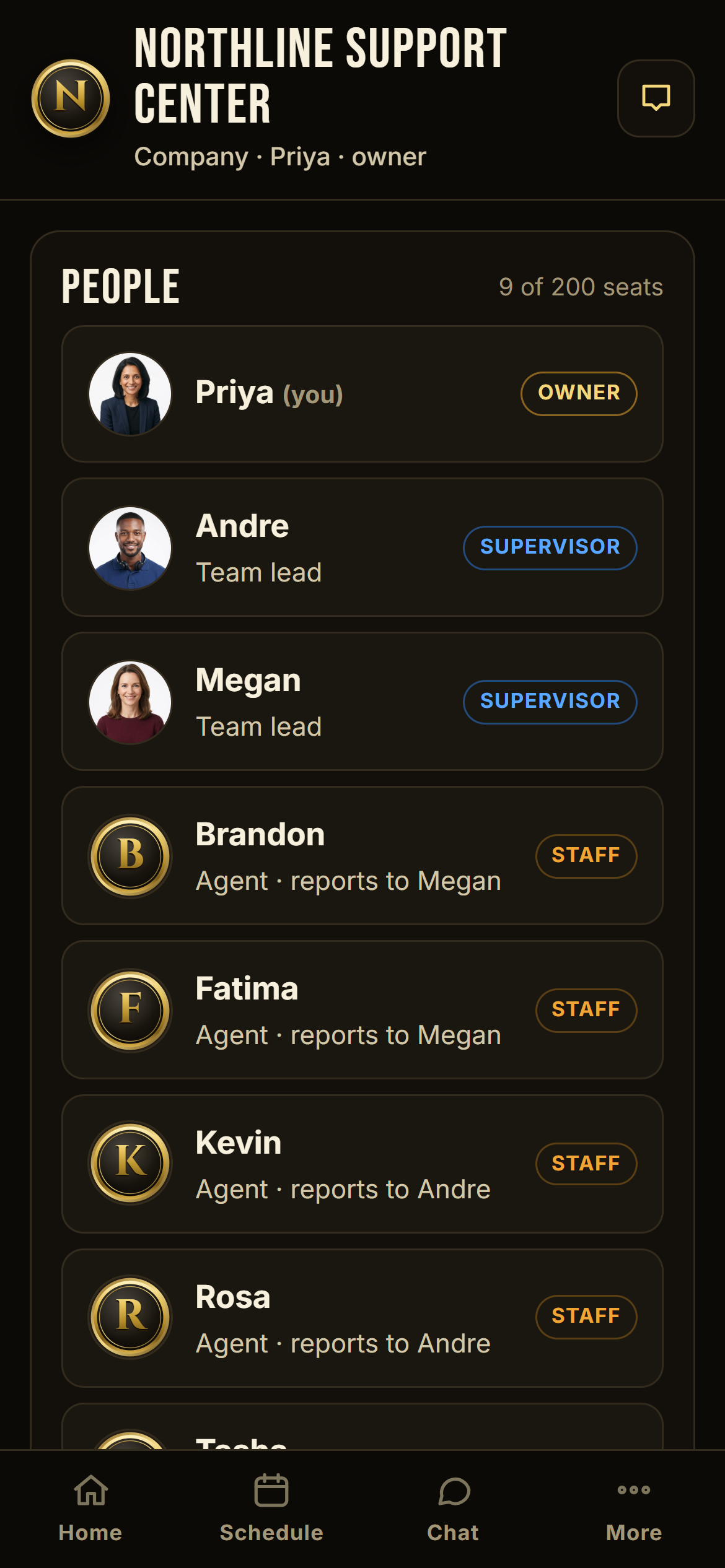
Company people screen with owner, supervisors, and agents
Priya owns it. Andre and Megan lead teams. Andre's announcement reaches his six agents, nobody else.
Companies

A real org tree, not a flat list.

Owner at the top. Team leads with agents under them. A team lead's announcement reaches their agents. Yours reaches the whole floor, or just the leads ("Q4 schedules due Friday"), or the picnic invite to everyone with families welcome.

  • Group chat off by default for companies. Agents still get every announcement aimed at them.
  • Vacation and sick calls go to the direct supervisor, with approve and deny buttons.
  • $99 flat for 200 people. Removed seats stop billing the same day. Cancel from inside the app in one tap.
"Jalen is home, 3:42 PM." Seen from the break room.
Tickets, pickups, appointments. One family calendar.
Hours and on-time, without asking anyone.
Cracked mirror, photographed, time-stamped, sent.
One app, four ways

Pick your kind. It only sets the defaults.

A family, a house with staff, a crew of drivers, or a company with supervisors and teams. Same engine underneath. The owner can flip every switch later: who can chat, who can send announcements, who sees what.

Up to 9 people
Family
One flat price for the whole family. 14-day free trial. See pricing
  • Kids tap I'm home, you get the time at work
  • Chores with Done, photo, and parent approval
  • Daycare pickup pings 60 and 30 min ahead, both parents if nobody taps Got them
  • Shared calendar, family chat, both parents equal
  • Kids sign in with a PIN, and the app locks behind it. A lost phone, a teacher, a stranger: nobody reads your family's business
Mom, dad, kids, grandma, the co-parent across town.
See the Family plan Start the trial
Up to 20 people
Household
One flat price for the house. 14-day free trial. See pricing
  • Family circle plus a Staff circle in one house
  • Chef, trainer, cleaner, lawn care get a schedule and check in by location on their own phone
  • Hours add up automatically, on-time report per visit
  • Staff message you only, never each other, unless you say so
Your family plus the people who work at your house.
See the Household plan Start the trial
Up to 50 people
Crew
One flat price for the whole crew. 14-day free trial. See pricing
  • Clock in by location, flagged not blocked when signal is weak
  • Damage reports with photos go straight to you
  • Open shift board: post the overtime, first tap takes it
  • Hiring and safety announcements with read receipts
Trucking, apartment complexes, contractors, cleaning crews.
See the Crew plan Start the trial
Up to 200 people
Company
One flat price for the whole company. 14-day free trial. See pricing
  • Supervisors with teams under them, nested as deep as you need
  • A supervisor's announcement reaches their team. Yours reaches whoever you pick
  • Group chat off, announcements still get through
  • Time off and sick calls route to the right supervisor
Call centers, offices, warehouses, clinics.
See the Company plan Start the trial
Why people switch

Them vs. us.

Pulled from real one-star reviews of the family organizers, location trackers, and time-clock apps people are using today.

THEM: paywall bait and switch

The most popular family calendar locked its free plan to 30 days of history and dropped to 2 stars. Location apps cap you at two places, then nag.

US: one price, the whole family

$3.99 a month covers one parent or two and every kid you have. Nothing gets locked later. We never take a feature away.

THEM: 24/7 tracking, dead batteries, sold data

The big family tracker warns about battery drain in its own listing, sold precise location data to brokers, and teens trade tricks to beat it.

US: location at the tap only

No trail exists. We store a yes/no "within range" and a distance. Nothing to sell, nothing to drain.

THEM: notifications that silently die

One app's own support page says to reinstall when pushes stop. Others spam 45 alerts when someone opens the app.

US: inbox plus a test button

Every push also lands in your inbox. Tap "test my notifications" any time and see it arrive.

THEM: everyone can delete everything

Most family apps have no roles. Kids sign in with the shared family password and can erase the calendar.

US: owner, supervisor, member

Both parents are owners. Kids are members with their own PIN. Staff see only their own schedule.

THEM: per-seat pricing surprises

"$29" turns into $87 once each module bills separately. Some raise prices 80 percent at renewal and bill you for people who quit.

US: one flat number per plan

Family, Household, Crew, Company. The price on this page is the price. Removed seats stop the same day.

THEM: punches lost, workers blocked

Time clocks block clock-in on weak signal or drop offline punches, and people get short paychecks.

US: never lose a punch

Weak GPS is accepted and flagged for you to look at. Offline taps queue and sync with the original time.

Two promises

Built for the family the other apps forgot.

One price. Every kid included.

$3.99 a month for the whole family, one parent or two. Four kids, five kids, it doesn't matter. No per-kid charge, no 30-day calendar lock, no two-place limit, no nag screen. Less than one drive-through coffee.

Both parents, same power.

Make your co-parent an owner and you both create, approve, and flip every switch. Kids get their own PIN and only their own chores. Nobody can wipe the calendar by accident. Most family apps hand everyone one shared password.

Pricing

Flat. Published. Never per seat.

Yearly is two months free. Every plan starts with a 14-day free trial, no card needed. Pay by card inside the app whenever you are ready, and cancel any time.

Every kid included
Family
$3.99/mo
or $39 a year. One parent or two.
Up to 9 people
  • I'm home check-ins
  • Chores with approval + points
  • Pickups, appointments, daily routines
  • Family calendar + chat
  • Two co-owner parents
Start 14-day free trialSubscribe now
Household
$9.99/mo
or $99 a year
Up to 20 people
  • Everything in Family
  • Staff circle with schedules
  • Proximity check-in on their phone
  • Hours + on-time report
  • Staff message you only
Start 14-day free trialSubscribe now
Crew
$29/mo
or $290 a year
Up to 50 people
  • Everything in Household
  • Open shift board, I'll take it
  • Damage reports with photos
  • Requests routed to supervisor
  • Hiring + safety announcements
Start 14-day free trialSubscribe now
Company
$99/mo
or $990 a year
Up to 200 people
  • Everything in Crew
  • Nested supervisors and teams
  • Audience-picked announcements
  • Group chat off, announcements on
  • Read receipts on everything
Start 14-day free trialSubscribe now
The promise: the price on this page is the price inside your plan's seat limit. No modules billed separately, no minimum spend, no charge for people who left. And your data exports in one tap, always.
Questions

Straight answers.

Does it track my kids?

No. There is no background location at all. When someone taps a check-in button the phone shares its position once, we compare it to your home radius, and we keep a yes/no plus the distance. No map, no history, no trail. Teens don't fight it because there's nothing to fight.

What happens if my kid loses the phone?

Nothing gets out. Kids sign in with a PIN, and the app locks behind that PIN every time it is opened and after five minutes away. Chat, calendar, check-ins, and the vault stay closed. Unlike text messages, nobody can read it without the PIN.

Do kids need an email or a phone number?

No. A parent adds them by first name and gives them a PIN. They sign in with the family's 6-letter code, their name, and the PIN. Nothing about a child is collected beyond that.

I'm a single parent with four kids. What does it cost me?

$3.99 a month, same as a two-parent family. Every kid is included, there is no per-kid charge, and the first 14 days are free.

Can it remind Grandma about her morning routine?

Yes. Add a routine for the time of day, assigned to her. She gets a nudge with a Done button, and if she doesn't tap it, the owners get pinged.

Can both parents have the same power?

Yes. Make your co-parent an owner. Owners see everything, create everything, and flip every switch. Most family apps have no roles at all, so anyone, including the kids, can delete anything.

What if the phone has no signal when someone checks in?

The tap is saved anyway. Weak or missing GPS gets flagged "location unconfirmed" so you can see it. If the phone is offline, the tap queues and sends when it's back, with the original time. We never block an honest check-in.

Can I turn off group chat for my employees but still send announcements?

Yes, that's one switch. Company plans start with group chat off. Announcements always get through. Direct messages can be "anyone," "only up the chain," or off.

How do open shifts work?

Post the shift as an announcement. Everyone you aimed it at gets a push. The first person to tap "I'll take it" gets it, or you can require your approval first. You see who took it and when.

Does it work on iPhone and Android?

Yes. It runs in the browser and installs to your home screen like an app. The Android app store listing is coming next. Notifications work on Android right away, and on iPhone once it's added to the home screen.

Can I get my data out?

Any time. Owners have a one-tap export of everything in the group as a file. We built that first because one of the most popular chore apps shut down with families' data trapped inside.

Ready when you are

Everybody checks in.
Everybody knows.

Create your family in under two minutes. $3.99 a month, every kid included.

Start your free trial
Every plan includes a 14-day free trial. Cancel from inside the app.